Zig self-hosted backend lowers a seq_cst @atomicRmw(.Xchg) with a discarded result to a plain mov

Finding codegen bugs for atomic operations is fun! I’ll note that I am not a Zig developer. I don’t write code in the language, and I don’t work on the language. I’m just some guy who decided to learn a bit about it.

The Zig programming language has two compilers that are widely used: one generates LLVM IR that libLLVM then builds into native code, and the other is a self-hosted compiler which eschews LLVM and does its own codegen.

It’s important to note that the self-hosted compiler is only currently (as of late October 2026) used on x86_64 Debug targets. All other targets use the LLVM backend by default.

_ = @atomicRmw(u32, p, .Xchg, 1, .seq_cst); is a sequentially consistent exchange. On x86 that is xchg with a memory operand, which is implicitly locked and is a full barrier. When the result is discarded, Zig’s self-hosted x86_64 backend emits a plain mov store instead. A plain store on x86 lets a later load be reordered before it (StoreLoad), so the operation loses its seq_cst ordering. Any build that uses the self-hosted x86_64 backend is affected. That backend is the default for -O Debug on x86_64-linux, and -fno-llvm selects it explicitly.

The same backend emits xchg when the result is used. So does a lock acquired by testing the exchange’s return value, which is not affected. Zig’s LLVM backend and gcc emit xchg in both cases.

This affects softwhare when: code discards the exchange’s result, and then relies on access of a different variable to be executed by the processor after that xchg. An example could be code sets its own flag, then reads another thread’s flag.

Affected: Zig 0.16.0 (Fedora 44 package), 0.17.0 and (current at the time) master 0.18.0-dev.367+187d0bf9e (commit 187d0bf9e483, 2026-10-19), all with the self-hosted x86_64 backend (the default for -O Debug -target x86_64-linux). The LLVM backend (-fllvm) is not affected.

Reproducing the codegen bug

In order to see the codegen bug, you can build a small source file and disassemble it:

export fn xchg_unused(p: *u32) void {
    _ = @atomicRmw(u32, p, .Xchg, 1, .seq_cst);    // BUG: result discarded -> plain mov
}
export fn xchg_used(p: *u32) u32 {                 // control
    return @atomicRmw(u32, p, .Xchg, 1, .seq_cst);
}

We can then compare the result with some C code built with a variety of different toolchains, but gcc -O0 gives us the closest result to the self-hosted Zig compiler’s output.

void xchg_unused(unsigned *p) { (void)__atomic_exchange_n(p, 1, __ATOMIC_SEQ_CST); }

The (annotated) gcc output for the C code looks like this:

+ x86_64-linux-gnu-gcc -O0 -c /repro/src/xchg.c -o /tmp/xchg/gcc-O0/xchg.o
+ cd /tmp/xchg/gcc-O0 && x86_64-linux-gnu-objdump -d --no-addresses --disassemble=xchg_unused xchg.o > xchg_unused.objdump
<xchg_unused>:
	55                   	push   %rbp
	48 89 e5             	mov    %rsp,%rbp
	48 89 7d f8          	mov    %rdi,-0x8(%rbp)
	48 8b 45 f8          	mov    -0x8(%rbp),%rax
	ba 01 00 00 00       	mov    $0x1,%edx
	87 10                	xchg   %edx,(%rax)      # opcode 87: xchg, implicitly locked: correct
	90                   	nop
	5d                   	pop    %rbp
	c3                   	ret
RESULT[gcc -O0 (16.2.1)]: OK, 1 locked/fencing instruction(s)

While we can see the difference in the code generated by the Zig compiler below, annotated as to where the bug is:

+ /opt/zig-0.17.0/zig build-obj /repro/src/xchg.zig -target x86_64-linux -O Debug -femit-bin=/tmp/xchg/zig-0.17.0/xchg.o
+ cd /tmp/xchg/zig-0.17.0 && x86_64-linux-gnu-objdump -d --no-addresses --disassemble=xchg_unused xchg.o > xchg_unused.objdump
+ diff -u /tmp/xchg/gcc-O0/xchg_unused.objdump /tmp/xchg/zig-0.17.0/xchg_unused.objdump
@@ -7,10 +7,12 @@
 <xchg_unused>:
 	55                   	push   %rbp
 	48 89 e5             	mov    %rsp,%rbp
-	48 89 7d f8          	mov    %rdi,-0x8(%rbp)
-	48 8b 45 f8          	mov    -0x8(%rbp),%rax
-	ba 01 00 00 00       	mov    $0x1,%edx
-	87 10                	xchg   %edx,(%rax)      # gcc: the locked exchange…
-	90                   	nop
+	53                   	push   %rbx
+	48 83 ec 08          	sub    $0x8,%rsp
+	48 89 3c 24          	mov    %rdi,(%rsp)
+	be 01 00 00 00       	mov    $0x1,%esi
+	89 37                	mov    %esi,(%rdi)      # …Zig: opcode 89, a plain store, and no lock or fence anywhere
+	48 8d 65 f8          	lea    -0x8(%rbp),%rsp
+	5b                   	pop    %rbx
 	5d                   	pop    %rbp
 	c3                   	ret
RESULT[zig-0.17.0]: BUG, no xchg, lock or mfence: the exchange is a plain store

While there’s a bunch of boilerplate around function entry/exit that differs between the two, the xchg and mov are fairly visible in the middle. If we diff the output of the xchg_used and xchg_unused from the self-hosted Zig compiler, we remove the boiler plate delta:

+ diff -u /tmp/xchg/zig-0.17.0/xchg_unused.objdump /tmp/xchg/zig-0.17.0/xchg_used.objdump
-<xchg_unused>:
+<xchg_used>:
 …
 	be 01 00 00 00       	mov    $0x1,%esi
-	89 37                	mov    %esi,(%rdi)
+	87 37                	xchg   %esi,(%rdi)
+	89 f0                	mov    %esi,%eax

Reproducing at runtime

Since it is always a pile of fun to reproduce concurrency bugs, catching this at runtime means running a bunch of iterations and looking for a fail condition. The following does that, with two threads:

//   thread A: exchange(x, 1) seq_cst; r1 = load(y) seq_cst
//   thread B: exchange(y, 1) seq_cst; r2 = load(x) seq_cst
//
// seq_cst forbids r1 == 0 and r2 == 0 together: whichever exchange comes first in the
// single total order is visible to the other thread's load. The program counts how often
// both loads read 0 in three trials:
//
//   relaxed    monotonic store, then monotonic load. Both-zero is allowed here, and is what
//              x86 does for a plain `mov` store followed by a load. Shows the test can see it.
//   discarded  seq_cst exchange, result discarded. The bug: the self-hosted x86_64 backend
//              emits a plain `mov`, so this behaves like `relaxed`.
//   used       seq_cst exchange, result used. Control: emitted as `xchg`, never both-zero.
//
// Exits 1 if both-zero was seen in either seq_cst trial.
const std = @import("std");

const iterations = 1_000_000;

var x: u32 = 0;
var y: u32 = 0;
var go: u32 = 0; // iteration the threads should run next; set by main
var done: u32 = 0; // threads that finished the current iteration

const Mode = enum { relaxed, discarded, used };

fn Worker(comptime mode: Mode) type {
    return struct {
        fn run(mine: *u32, other: *u32, seen: *u32, old: *u32) void {
            var i: u32 = 1;
            while (i <= iterations) : (i += 1) {
                while (@atomicLoad(u32, &go, .acquire) != i) std.atomic.spinLoopHint();
                switch (mode) {
                    .relaxed => @atomicStore(u32, mine, 1, .monotonic),
                    .discarded => _ = @atomicRmw(u32, mine, .Xchg, 1, .seq_cst), // BUG: plain `mov`
                    .used => old.* = @atomicRmw(u32, mine, .Xchg, 1, .seq_cst), // control: `xchg`
                }
                seen.* = @atomicLoad(u32, other, if (mode == .relaxed) .monotonic else .seq_cst);
                _ = @atomicRmw(u32, &done, .Add, 1, .acq_rel);
            }
        }
    };
}

fn trial(comptime mode: Mode) !u32 {
    const W = Worker(mode);
    var r1: u32 = 0;
    var r2: u32 = 0;
    var old1: u32 = 0;
    var old2: u32 = 0;
    go = 0;
    done = 0;
    const a = try std.Thread.spawn(.{}, W.run, .{ &x, &y, &r1, &old1 });
    const b = try std.Thread.spawn(.{}, W.run, .{ &y, &x, &r2, &old2 });
    var both_zero: u32 = 0;
    var i: u32 = 1;
    while (i <= iterations) : (i += 1) {
        @atomicStore(u32, &x, 0, .seq_cst);
        @atomicStore(u32, &y, 0, .seq_cst);
        @atomicStore(u32, &go, i, .release); // start both threads
        while (@atomicLoad(u32, &done, .acquire) != 2 * i) std.atomic.spinLoopHint();
        if (r1 == 0 and r2 == 0) both_zero += 1; // forbidden in the two seq_cst trials
    }
    a.join();
    b.join();
    return both_zero;
}

pub fn main() !void {
    const relaxed = try trial(.relaxed);
    const discarded = try trial(.discarded);
    const used = try trial(.used);
    std.debug.print("relaxed store+load (allowed):        both loads read 0 in {d} of {d} iterations\n", .{ relaxed, iterations });
    std.debug.print("seq_cst xchg, result discarded:      both loads read 0 in {d} of {d} iterations\n", .{ discarded, iterations });
    std.debug.print("seq_cst xchg, result used (control): both loads read 0 in {d} of {d} iterations\n", .{ used, iterations });
    if (discarded != 0 or used != 0) std.process.exit(1);
}

This will reproduce on x86-64 systems fairly easily. I’ll note that I didn’t get qemu to reproduce when doing usermode emulation on an aarch64 host, so be sure to try on a real x86-64 system (and almost certainly a multi-core one). Below, we have the output of running the binary produced by the self hosted Zig compiler, and then the output of the binary built with the LLVM based one:


    sb-0.17.0 Worker(.discarded): 89 3e   mov    %edi,(%rsi)      # self-hosted: plain store
    sb-0.17.0 Worker(.used): 87 3e        xchg   %edi,(%rsi)
    sb-0.17.0-llvm Worker(.discarded): 87 16   xchg   %edx,(%rsi) # LLVM: xchg either way
+ /tmp/sb/sb-0.17.0
relaxed store+load (allowed):        both loads read 0 in 96990 of 1000000 iterations
seq_cst xchg, result discarded:      both loads read 0 in 128430 of 1000000 iterations   # forbidden, seen 13% of the time
seq_cst xchg, result used (control): both loads read 0 in 0 of 1000000 iterations
RESULT[sb-0.17.0]: BUG, both loads read 0 under seq_cst

+ /tmp/sb/sb-0.17.0-llvm
relaxed store+load (allowed):        both loads read 0 in 41808 of 1000000 iterations
seq_cst xchg, result discarded:      both loads read 0 in 0 of 1000000 iterations      # same source, LLVM backend
seq_cst xchg, result used (control): both loads read 0 in 0 of 1000000 iterations
RESULT[sb-0.17.0-llvm]: OK, seq_cst ordering held

I’ve reproduced this with the 0.16 version shipped in Fedora 44, the upstream 0.17 binaries, and upstream nightly build 0.18.0-dev.367+187d0bf9e.

Okay, but get Volume 3A of the Intel® 64 and IA-32 Architectures Software Developer’s Manual nerdy with me

Specifically, “11.2.2 Memory Ordering in P6 and More Recent Processor Families” in the Intel® 64 and IA-32 Architectures Software Developer’s Manual Volume 3A has two relevant rules:

  1. “Reads may be reordered with older writes to different locations but not with older writes to the same location.” This is what the plain mov allows: a later load can complete before the store is visible to other processors.
  2. “Reads or writes cannot be reordered with I/O instructions, locked instructions, or serializing instructions.” This is what a locked instruction guarantees, and seq_cst requires it.

The Zig language appears to have a big TODO in their language documentation around Atomics, and the std documentation for what the enum is for AtomicOrder. The upstream LLVM docs are rather complete.

“Additionally, the code generator must enforce ordering between SequentiallyConsistent stores followed by SequentiallyConsistent loads” – https://llvm.org/docs/Atomics.html#sequentiallyconsistent

Did I report this upstream?

No, because doing so would be a violation of the Code of Conduct. Specifically, let’s look at the LLM/AI policy part:

Since I used an LLM to help me learn a bit about Zig and how it works, and then got it to help isolate this down, the “No LLMs for finding bugs” undoubtedly applies. Later on, there’s also the explicit example of unacceptable behavior being “Discussing this Code of Conduct“.

I’ve written this up because others may find it interesting, and maybe this helps someone debug their concurrent Zig application at some point.

Swift code for talking to the Shotwell database

A flashback to a few years in the past, this has sat as a draft for too long. See previously: Getting your photos out of Shotwell and Every time I program a Mac…

So…. what does the code to read the Shotwell database look like?

First, we’re going to have to import some of the modules we need:

import Foundation
import SQLite3
import SwiftUI
import Photos

I forget what SwiftUI here is for… I think it’s for my bit of integration with the UI I have.

From here I can start to model the bits of the Shotwell database that I’ll possibly need, but using more idiomatic Swift than raw SQL queries in random places. This is what I ended up for having information about a Photo:

class ShotwellPhotoInfo : Codable, Identifiable, Hashable {
    static func == (lhs: ShotwellPhotoInfo, rhs: ShotwellPhotoInfo) -> Bool {
        return lhs.id == rhs.id
    }
    
    func hash(into hasher: inout Hasher) {
        hasher.combine(id)
    }
    
    var id : Int32 = 0
    var filename : String = ""
    var translated_filename : String = ""
    var orientation : Int32 = 0
    var original_orientation : Int32 = 0
    var import_id : Int32 = 0
    var event_id : Int32 = 0
    var event : ShotwellEventInfo?
    var transformations : String = ""
    var md5 : String = ""
    var flags: Int32 = 0
    var rating: Int32 = 0
    var title: String = ""
    var raw_backlinks : String = ""
    var backlinks : ShotwellBacklinks?
    var comment : String = ""
    var has_gps : Bool = false
    var gps_lat : Double = 0.0
    var gps_lon : Double = 0.0
}

The comparison function is just comparing the id, which since that’s a primary key in the database, are unique. The hash function also just acts on id because of this.

The translated_filename is not in the Shotwell database, but rather for me to do various transformations on the filename in the shotwell database so that I can actually find the file. The natural translation is going to be for wherever I have mounted my photos, but there were some other weirdness likely due to some symlinks and such I’ve had.

The Shotwell Database Architecture documentation says this:

  • backlinks are persistent links to container objects, i.e. Events and Tags. These are used when a Photo has been removed from one (for example, it’s been trashed or marked offline). If the Photo is returned to the main heap of photos (i.e. untrashed), these backlinks are used to restore its connections to the containers.
https://wiki.gnome.org/Apps/Shotwell/Architecture/Database

So it appears that Backlinks may be rather useful to find out everything I need to know about a Photo that I am looking to import. Thus, we will need to model Events and Tags as well, which are familiar concepts from the Shotwell UI.

Since there are Tags in Shotwell, I need to model them as well:

class ShotwellTag : Codable, Identifiable, Hashable {
    static func == (lhs: ShotwellTag, rhs: ShotwellTag) -> Bool {
        return lhs.id == rhs.id
    }
    
    func hash(into hasher: inout Hasher) {
        hasher.combine(id)
    }
    let id : Int32
    let name : String
    let photo_id_list : [Int32]
    let time_created : Int32
    let photos : [ShotwellPhotoInfo]
    init(id: Int32, name: String, photo_id_list: [Int32], time_created: Int32, photos: [ShotwellPhotoInfo]) {
        self.id = id
        self.name = name
        self.photo_id_list = photo_id_list
        self.time_created = time_created
        self.photos = photos
    }
}

Again, we have an id as a primary key, and the photos in a tag are referenced as a list of IDs.

For an Event, this is what I ended up with:

struct ShotwellEventInfo : Codable, Identifiable {
    let id : Int32
    let name : String
    let primary_photo_id : Int32
    let time_created : Int32
    let primary_source_id : Int32
    let comment : String
}

and for backlinks:

class ShotwellBacklinks : Codable {
    var tag : [ShotwellTag?] = []
    var event : [String] = []
    var other : [String] = []
}

But as for just getting some basic information out of the database? That we can start off with by having a class for opening it, and run some simple queries, and even display them in the UI just to prove we can.

class ShotwellDatabase {
    var db: OpaquePointer?
    var import_query: OpaquePointer?
    var dbPath : String?
    
    struct db_version {
        var schema_version: Int32 = 0
        var app_version: String = ""
        init() {
            schema_version = 0
            app_version = ""
        }
    }
    
    func open_db(shotwellDB: String) -> Bool {
        dbPath = shotwellDB
        if sqlite3_open(shotwellDB, &db) == SQLITE_OK {
            print("Opened Shotwell Database!")
        }
        return db != nil
    }
    
    func get_db_version() -> db_version {
        let query = "SELECT schema_version, app_version FROM VersionTable"
        var queryStatement: OpaquePointer?
        var r = db_version()
        
        if sqlite3_prepare_v2(db, query, -1, &queryStatement, nil) == SQLITE_OK {
            if sqlite3_step(queryStatement) == SQLITE_ROW {
                r.schema_version = sqlite3_column_int(queryStatement, 0)
                
                guard let app_version = sqlite3_column_text(queryStatement, 1) else {
                    print("Couldn't get app version")
                    r.app_version = ""
                    return r
                }
                
                r.app_version = String(cString: app_version)
            }
        }
        return r
    }

The database version is more about just verifying I could link things together than anything actually useful. Continuing the ShotwellDatabase class, getting the total number of photos is pretty easy (added to the ShotwellDatabase class above):

    
    func get_photos_count() -> Int64 {
        let query = "SELECT COUNT(id) FROM PhotoTable"
        var queryStatement: OpaquePointer?

        if sqlite3_prepare_v2(db, query, -1, &queryStatement, nil) == SQLITE_OK {
            if sqlite3_step(queryStatement) == SQLITE_ROW {
                return sqlite3_column_int64(queryStatement, 0)
            }
        }
        return 0
    }

Again, that’s mostly just useful for some nice “oh look, I linked up the UI to the database” rather than anything of use (although progress bars may want to use it).

So, now that we can talk to the database, we can go and set things up to iterate over all the photos and load them up into memory. I’m not doing anything too fancy here as this is all very quick and dirty, and was literally the first time writing any Swift code.

The below code starts by opening the Database, then get_next_photo will iterate over everything before done_all_photos can close things up. The commented out block of code below does something pretty neat, and that’s print out a JSON representation of our photo. I found this incredibly easy to set up in Swift.

    func start_get_all_photos() -> OpaquePointer? {
        var db: OpaquePointer?
        if sqlite3_open(dbPath, &db) == SQLITE_OK {
            print("Opened Shotwell Database!")
        }
        start_import(db: db)
        return db
    }
    func get_next_photo(db: OpaquePointer?) -> ShotwellPhotoInfo? {
        var photo: ShotwellPhotoInfo?
            do {
                photo = db_get_next_photo(db: db)
                if photo != nil {
/*                    let encoder = JSONEncoder()
                    encoder.outputFormatting = .prettyPrinted
                    let jsonData = try encoder.encode(photo)
                    let jsonString = String(data: jsonData, encoding: .utf8)!
                    photo_info = jsonString
                    print(jsonString)
                    do_some_photo_things()
                    progress += 1 */
                    all_photos[photo!.id] = photo
                }
            } catch { print(error) }
        return photo
    }
    func done_all_photos(db: OpaquePointer?) {
        sqlite3_close(db)
    }

For parsing that row, I have the following class:

class ShotwellPhotoInfo : Codable, Identifiable, Hashable {
    static func == (lhs: ShotwellPhotoInfo, rhs: ShotwellPhotoInfo) -> Bool {
        return lhs.id == rhs.id
    }
    
    func hash(into hasher: inout Hasher) {
        hasher.combine(id)
    }
    
    var id : Int32 = 0
    var filename : String = ""
    var translated_filename : String = ""
    var orientation : Int32 = 0
    var original_orientation : Int32 = 0
    var import_id : Int32 = 0
    var event_id : Int32 = 0
    var event : ShotwellEventInfo?
    var transformations : String = ""
    var md5 : String = ""
    var flags: Int32 = 0
    var rating: Int32 = 0
    var title: String = ""
    var raw_backlinks : String = ""
    var backlinks : ShotwellBacklinks?
    var comment : String = ""
    var has_gps : Bool = false
    var gps_lat : Double = 0.0
    var gps_lon : Double = 0.0
}

and function in the ShotwellDatabase class:

    func db_get_next_photo(db: OpaquePointer?) -> ShotwellPhotoInfo? {
        var r = ShotwellPhotoInfo()
        if sqlite3_step(import_query) == SQLITE_ROW {
            r.id = sqlite3_column_int(import_query, 0)
            r.filename = String(cString: sqlite3_column_text(import_query, 1))
            r.orientation = sqlite3_column_int(import_query, 2)
            r.original_orientation = sqlite3_column_int(import_query, 3)
            r.import_id = sqlite3_column_int(import_query, 4)
            r.event_id = sqlite3_column_int(import_query, 5)
// FIXME:            r.event = get_event_info(db: db, id: r.event_id)
            let transformation = sqlite3_column_text(import_query, 6)
            if let t = transformation {
                r.transformations = String(cString: t)
            }
            let md5 = sqlite3_column_text(import_query, 7)
            if let t = md5 {
                r.md5 = String(cString: t)
            }
            r.flags = sqlite3_column_int(import_query, 8)
            r.rating = sqlite3_column_int(import_query, 9)
            let title = sqlite3_column_text(import_query, 10)
            if let t = title {
                r.title = String(cString: t)
            }
            let backlinks = sqlite3_column_text(import_query, 11)
            if let t = backlinks {
                r.raw_backlinks = String(cString: t)
                r.backlinks = process_backlinks(all_backlinks: r.raw_backlinks)
            }
            let comment = sqlite3_column_text(import_query, 12)
            if let t = comment {
                r.comment = String(cString: t)
            }
            r.has_gps = sqlite3_column_int(import_query, 13) != 0
            r.gps_lat = sqlite3_column_double(import_query, 14)
            r.gps_lon = sqlite3_column_double(import_query, 15)
        } else {
            return nil
        }
        return r
    }

So with that combined, I ended up with my global var all_photos: [Int32: ShotwellPhotoInfo] = [:] containing all the photos in the shotwell database able to be looked up by ID. I’m sure there’s a more idiomatic way to do this in Swift… but the learning as I went, and need to only ever run this once certainly encouraged me to take some shortcuts.

There’s two interesting bits in that code. There’s the process_backlinks function, which does the thing of processing this giant text string that Shotwell stores that points the photo back to everywhere it has been referenced, as well as the FIXME around event information. I ended up giving up on translating Events, as these were never something I used much.

Parsing the backlinks I did with this:

    func process_backlinks(all_backlinks : String) -> ShotwellBacklinks {
        var r = ShotwellBacklinks()
        let backlinks = all_backlinks.split(separator: "\n").map( {String($0)})
        
        for backlink in backlinks {
            let kv = backlink.split(separator: "=")
            switch kv.first {
            case "tag":
                let tag_ids = kv[1].split(separator: "|").map( {Int32($0)})
                for tag_id in tag_ids {
                    if tag_id != nil {
                        if tag_id! > 0 {
                            r.tag.append(all_tags[tag_id!])
                        }
                    }
                }
                break
            case "event":
                let events = kv[1].split(separator: "|").map( {String($0)})
                r.event = events
                break
            default:
                r.other.append(contentsOf: kv.map({String($0)}))
            }
        }
        
        return r
    }

and the very simple ShotwellBacklinks class:

class ShotwellBacklinks : Codable {
    var tag : [ShotwellTag?] = []
    var event : [String] = []
    var other : [String] = []
}

But to start to get a view as to what Tags exist in the shotwell database, we can just go through the TagTable in the Shotwell SQLite database (added to the ShotwellDatabase class above):

    func get_all_tags() {
        var db: OpaquePointer?
        if sqlite3_open(dbPath, &db) == SQLITE_OK {
            print("Opened Shotwell Database!")
        }
        let query = "SELECT id, name, photo_id_list, time_created FROM TagTable"
        var q : OpaquePointer?
        
        if sqlite3_prepare_v2(db, query, -1, &q, nil) != SQLITE_OK {
            print("Failed to prepare query")
            assert(false)
        }
        
        while sqlite3_step(q) == SQLITE_ROW {
            let r = tag_row_to_ShotwellTag(q: q)
            
            all_tags[r.id] = r
            for photo_id in r.photo_id_list {
                photoToTags[photo_id]?.append(r)
            }
        }
        sqlite3_finalize(q)
        sqlite3_close(db)
    }

I did the hacky thing and just added var all_tags: [Int32: ShotwellTag] = [:] as a global variable, that I then used in the UI element showing them (well… via a wrapper, but that’s how that goes).

We just now need the tag_row_to_ShotwellTag that’s called above:

    func tag_row_to_ShotwellTag(q: OpaquePointer?) -> ShotwellTag {
        let id = sqlite3_column_int(q, 0)
        let c_name = sqlite3_column_text(q, 1)
        let c_photo_id_list = sqlite3_column_text(q, 2)
        let time_created = sqlite3_column_int(q, 3  )
        var name : String = ""
        var photo_id_list : [Int32] = []
        var photos : [ShotwellPhotoInfo] = []
        
        if let c_name = c_name {
            name = String(cString: c_name)
        }
        
        if let c_photo_id_list = c_photo_id_list {
            let photo_ids = String(cString: c_photo_id_list).split(separator: ",")
            photo_id_list.reserveCapacity(photo_ids.count)
            for photo_id in photo_ids {
                if photo_id.hasPrefix("thumb") {
                    var id = photo_id
                    id.removeFirst(5)
                    photo_id_list.append(Int32(id, radix: 16)!)
                    let photo = all_photos[Int32(id, radix: 16)!]
                    if photo == nil {
                        print("Couldn't find photo id " + id)
                    } else {
                        photos.append(photo!)
                    }
                } else {
                    print("UNKNOWN PREFIX FOR " + photo_id)
                }
            }
        }
        return ShotwellTag(id: id, name: name, photo_id_list: photo_id_list, time_created: time_created, photos: photos)
    }
    

Using llvm-mca for predicting CPU cycle impact of code changes

Way back in the distant past, when the Apple ][ and the Commodore 64 were king, you could read the manual for a microprocessor and see how many CPU cycles each instruction took, and then do the math as to how long a sequence of instructions would take to execute. This cycle counting was used pretty effectively to do really neat things such as how you’d get anything on the screen from an Atari 2600. Modern CPUs are… complex. They can do several things at once, in a different order than what you wrote them in, and have an interesting arrangement of shared resources to allocate.

So, unlike with simpler hardware, if you have a sequence of instructions for a modern processor, it’s going to be pretty hard to work out how many cycles that could take by hand, and it’s going to differ for each micro-architecture available for the instruction set.

When designing a microprocessor, simulating what a series of existing instructions will take to execute compared to the previous generation of microprocessor is pretty important. The aim should be for it to take less time or energy or some other metric that means your new processor is better than the old one. It can be okay if processor generation to generation some sequence of instructions take more cycles, if your cycles are more frequent, or power efficient, or other positive metric you’re designing for.

Programmers may want this simulation too, as some code paths get rather performance critical for certain applications. Open Source tools for this aren’t as prolific as I’d like, but there is llvm-mca which I (relatively) recently learned about.

llvm-mca is a performance analysis tool that uses information available in LLVM (e.g. scheduling models) to statically measure the performance of machine code in a specific CPU.

the llvm-mca docs

So, when looking at an issue in the IPv6 address and connection hashing code in Linux last year, and being quite conscious of modern systems dealing with a LOT of network packets, and thus this can be quite CPU usage sensitive, I wanted to make sure that my suggested changes weren’t going to have a large impact on performance – across the variety of CPU generations in use.

There’s two ways to do this: run everything, throw a lot of packets at something, and measure it. That can be a long dev cycle, and sometimes just annoying to get going. It can be a lot quicker to simulate the small section of code in question and do some analysis of it before going through the trouble of spinning up multiple test environments to prove it in the real world.

So, enter llvm-mca and the ability to try and quickly evaluate possible changes before testing them. Seeing as the code in question was nicely self contained, I could easily get this to a point where I could easily get gcc (or llvm) to spit out assembler for it separately from the kernel tree. My preference was for gcc as that’s what most distros end up compiling Linux with, including the Linux distribution that’s my day job (Amazon Linux).

In order to share the results of the experiments as part of the discussion on where the code changes should end up, I published the code and results in a github project as things got way too large to throw on a mailing list post and retain sanity.

I used a container so that I could easily run it in a repeatable isolated environment, as well as have others reproduce my results if needed. Different compiler versions and optimization levels will very much produce different sequences of instructions, and thus possibly quite different results. This delta in compiler optimization levels is partially why the numbers don’t quite match on some of the mailing list messages, although the delta of the various options was all the same. The other reason is learning how to better use llvm-mca to isolate down the exact sequence of instructions I was caring about (and not including things like the guesswork that llvm-mca has to do for branches).

One thing I learned along the way is how to better use llvm-mca to get the results that I was looking for. One trick is to very much avoid branches, as that’s going to be near complete guesswork as there’s not a simulation of the branch predictor (at least in the version I was using.

The big thing I wanted to prove: is doing the extra work having a small or large impact on number of elapsed cycles. The answer was that doing a bunch of extra “work” was essentially near free. The CPU core could execute enough things in parallel that the incremental cost of doing extra work just… wasn’t relevant.

This helped getting a patch deployed without impact to performance, as well as get a patch upstream, fixing an issue that was partially fixed 10 years prior, and had existed since day 1 of the Linux IPv6 code.

Naturally, this wasn’t a solo effort, and that’s one of the joys of working with a bunch of smart people – both at the same company I work for, and in the broader open source community. It’s always humbling when you’re looking at code outside your usual area of expertise that was written (and then modified) by Really Smart People, and you’re then trying to fix a problem in it, while trying to learn all the implications of changing that bit of code.

Anyway, check out llvm-mca for your next adventure into premature optimization, as if you’re going to get started with evil, you may as well start with what’s at the root of all of it.

Personal Finance Apps

I (relatively) recently went down the rabbit hole of trying out personal finance apps to help get a better grip on, well, the things you’d expect (personal finances and planning around them).

In the past, I’ve had an off-again-on-again relationship with GNUCash. I did give it a solid go for a few months in 2004/2005 it seems (I found my old files) and I even had the OFX exports of transactions for a limited amount of time for a limited number of bank accounts! Amazingly, there’s a GNUCash port to macOS, and it’ll happily open up this file from what is alarmingly close to 20 years ago.

Back in those times, running Linux on the desktop was even more of an adventure than it has been since then, and I always found GNUCash to be strange (possibly a theme with me and personal finance software), but generally fine. It doesn’t seem to have changed a great deal in the years since. You still have to manually import data from your bank unless you happen to be lucky enough to live in the very limited number of places where there’s some kind of automation for it.

So, going back to GNUCash was an option. But I wanted to survey the land of what was available, and if it was possible to exchange money for convenience. I am not big on the motivation to go and spend a lot of time on this kind of thing anyway, so it had to be easy for me to do so.

For my requirements, I basically had:

  • Support multiple currencies
  • Be able to import data from my banks, even if manually
  • Some kind of reporting and planning tools
  • Be easy enough to use for me, and not leave me struggling with unknown concepts
  • The ability to export data. No vendor lock-in

I viewed a mobile app (iOS) as a Nice to Have rather than essential. Given that, my shortlist was:

GNUCash

I’ve used it before, its web site at https://www.gnucash.org/ looks much the same as it always has. It’s Free and Open Source Software, and is thus well aligned with my values, and that’s a big step towards not having vendor lock-in.

I honestly could probably make it work. I wish it had the ability to import transactions from banks for anywhere I have ever lived or banked with. I also wish the UI got to be a bit more consistent and modern, and even remotely Mac like on the Mac version.

Honestly, if the deal was that a web service would pull bank transactions in exchange for ~$10/month and also fund GNUCash development… I’d struggle to say no.

Quicken

Here’s an option that has been around forever – https://www.quicken.com/ – and one that I figured I should solidly look at. It’s actually one I even spent money on…. before requesting a refund. It’s Import/Export is so broken it’s an insult to broken software everywhere.

Did you know that Quicken doesn’t import the Quicken Interchange Format (QIF), and hasn’t since 2005?

Me, incredulously, when trying out quicken

I don’t understand why you wouldn’t support as many as possible formats that banks export your transaction data as. It cannot possibly be that hard to parse these things, nor can it possibly be code that requires a lot of maintenance.

This basically meant that I couldn’t import data from my Australian Banks. Urgh. This alone ruled it out.

It really didn’t build confidence in ever getting my data out. At every turn it seemed to be really keen on locking you into Quicken rather than having a good experience all-up.

Moneywiz

This one was new to me – https://www.wiz.money/ – and had a fancy URL and everything. I spent a bunch of time trying MoneyWiz, and I concluded that it is pretty, but buggy. I had managed to create a report where it said I’d earned $0, but you click into it, and then it gives actual numbers. Not being self consistent and getting the numbers wrong, when this is literally the only function of said app (to get the numbers right), took this out of the running.

It did sync from my US and Australian banks though, so points there.

Intuit Mint

Intuit used to own Quicken until it sold it to H.I.G. Capital in 2016 (according to Wikipedia). I have no idea if that has had an impact as to the feature set / usability of Quicken, but they now have this Cloud-only product called Mint.

The big issue I had with Mint was that there didn’t seem to be any way to get your data out of it. It seemed to exemplify vendor lock-in. This seems to have changed a bit since I was originally looking, which is good (maybe I just couldn’t find it?). But with the cloud-only approach I wasn’t hugely comfortable with having everything there. It also seemed to be lacking a few features that I was begging to find useful in other places.

It is the only product that links with the Apple Card though. No idea why that is the case.

The price tag of $0 was pretty unbeatable, which does make me wonder where the money is made from to fund its development and maintenance. My guess is that it’s through commission on the various financial products advertised through it, and I dearly hope it is not through selling data on its users (I have no reason to believe it is, there’s just the popular habit of companies doing this).

Banktivity

This is what I’ve settled on. It seemed to be easy enough for me to figure out how to use, sync with an iPhone App, be a reasonable price, and be able to import and sync things from accounts that I have. Oddly enough, nothing can connect and pull things from the Apple Card – which is really weird. That isn’t a Banktivity thing though, that’s just universal (except for Intuit’s Mint).

I’ve been using it for a bit more than a year now, and am still pretty happy. I wish there was the ability to attach a PDF of a statement to the Statement that you reconcile. I wish I could better tune the auto match/classification rules, and a few other relatively minor things.

Fitness watches and my descent into madness

Periodically in life I’ve had the desire to be somewhat fit, or at least have the benefits that come with that such as not dying early and being able to navigate a mountain (or just the city of Seattle) on foot without collapsing. I have also found that holding myself accountable via data is pretty vital to me actually going and repeatedly doing something.

So, at some point I got myself a Garmin watch. The year was 2012 and it was a Garmin Forerunner 410. It had a standard black/grey LCD screen, GPS (where getting a GPS lock could be utterly infuriatingly slow), a sensor you attached to your foot, a sensor you strap to your chest for Heart Rate monitoring, and an ANT+ dongle for connecting to a PC to download your activities. There was even some open source software that someone wrote so I could actually get data off my watch on my Linux laptops. This wasn’t a smart watch – it was exclusively for wearing while exercising and tracking an activity, otherwise it was just a watch.

However, as I was ramping up to marathon distance running, one huge flaw emerged: I was not fast enough to run a marathon in the time that the battery in my Garmin lasted. IIRC it would end up dying around 3hr30min into something, which at the time was increasingly something I’d describe as “not going for too long of a run”. So, the search for a replacement began!

The year was 2017, and the Garmin fenix 5x attracted me for two big reasons: a battery life to be respected, and turn-by-turn navigation. At the time, I seldom went running with a phone, preferring a tiny SanDisk media play (RIP, they made a new version that completely sucked) and a watch. The attraction of being able to get better maps back to where I started (e.g. a hotel in some strange city where I didn’t speak the language) was very appealing. It also had (what I would now describe as) rudimentary smart-watch features. It didn’t have even remotely everything the Pebble had, but it was enough.

So, a (non-trivial) pile of money later (even with discounts), I had myself a shiny and virtually indestructible new Garmin. I didn’t even need a dongle to sync it anywhere – it could just upload via its own WiFi connection, or through Bluetooth to the Garmin Connect app to my phone. I could also (if I ever remembered to), plug in the USB cable to it and download the activities to my computer.

One problem: my skin rebelled against the Garmin fenix 5x after a while. Like, properly rebelled. If it wasn’t coming off, I wanted to rip it off. I tried all of the tricks that are posted anywhere online. Didn’t help. I even got tested for what was the most likely culprit (a Nickel allergy), and didn’t have one of them, so I (still) have no idea what I’m actually allergic to in it. It’s just that I cannot wear it constantly. Urgh. I was enjoying the daily smart watch uses too!

So, that’s one rather expensive watch that is special purpose only, and even then started to get to be a bit of an issue around longer activities. Urgh.

So the hunt began for a smart watch that I could wear constantly. This usually ends in frustration as anything I wanted was hundreds of $ and pretty much nobody listed what materials were in it apart from “stainless steel”, “may contain”, and some disclaimer about “other materials”, which wasn’t a particularly useful starting point for “it is one of these things that my skin doesn’t like”. As at least if the next one also turned out to cause me problems, I could at least have a list of things that I could then narrow down to what I needed to avoid.

So that was all annoying, with the end result being that I went a long time without really wearing a watch. Why? The search resumed periodically and ended up either with nothing, or totally nothing. That was except if I wanted to get further into some vendor lock-in.

Honestly, the only manufacturer of anything smartwatch like which actually listed everything and had some options was Apple. Bizarre. Well, since I already got on the iPhone bandwagon, this was possible. Rather annoyingly, they are very tied together and thus it makes it a bit of a vendor-lock-in if you alternate phone and watch replacement and at any point wish to switch platforms.

That being said though, it does work well and not irritate my skin. So that’s a bonus! If I get back into marathon level distance running, we’ll see how well it goes. But for more common distances that I’ve run or cycled with it… the accuracy seems decent, HR monitor never just sometimes decides I’m not exerting myself, and the GPS actually gets a lock in reasonable time. Plus it can pair with headphones and be the only thing I take out with me.

Random useful macOS things for Linux developers

A few random notes about things that can make life on macOS (the modern one, as in, circa 2023) better for those coming from Linux.

For various reasons you may end up with Mac hardware with macOS on the metal rather than Linux. This could be anything from battery life of the Apple Silicon machines (and not quite being ready to jump on the Asahi Linux bandwagon), to being able to run the corporate suite of Enterprise Software (arguably a bug more than a feature), to some other reason that is also fine.

My approach to most of my development is to have a remote more powerful Linux machine to do the heavy lifting, or do Linux development on Linux, and not bank on messing around with a bunch of software on macOS that would approximate something on Linux. This also means I can move my GUI environment (the Mac) easily forward without worrying about whatever weird workarounds I needed to do in order to get things going for whatever development work I’m doing, and vice-versa.

Terminal emulator? iTerm2. The built in Terminal.app is fine, but there’s more than a few nice things in iTerm2, including tmux integration which can end up making it feel a lot more like a regular Linux machine. I should probably go read the tmux integration best practices before I complain about some random bugs I think I’ve hit, so let’s pretend I did that and everything is perfect.

I tend to use the Mac for SSHing to bigger Linux machines for most of my work. At work, that’s mostly to a Graviton 2 EC2 Instance running Amazon Linux with all my development environments on it. At home, it’s mostly a Raptor Blackbird POWER9 system running Fedora.

Running Linux locally? For all the use cases of containers, Podman Desktop or finch. There’s a GUI part of Podman which is nice, and finch I know about because of the relatively nearby team that works on it, and its relationship to lima. Lima positions itself as WSL2-like but for Mac. There’s UTM for a full virtual machine / qemu environment, although I rarely end up using this and am more commonly using a container or just SSHing to a bigger Linux box.

There’s XCode for any macOS development that may be needed (e.g. when you want that extra feature in UTM or something) I do use Homebrew to install a few things locally.

Have a read of Andrew‘s blog post on OpenBMC Development on an Apple M1 MacBook Pro too.

Getting your photos out of Shotwell

Somewhat a while ago now, I wrote about how every time I return to write some software for the Mac, the preferred language has changed. The purpose of this adventure was to get my photos out of the aging Shotwell and onto my (then new) Mac and the Apple Photos App.

I’ve had a pretty varied experience with photo management on Linux over the past couple of decades. For a while I used f-spot as it was the new hotness. At some point this became…. slow and crashy enough that it was unusable. Today, it appears that the GitHub project warns that current bugs include “Not starting”.

At some point (and via a method I have long since forgotten), I did manage to finally get my photos over to Shotwell, which was the new hotness at the time. That data migration was so long ago now I actually forget what features I was missing from f-spot that I was grumbling about. I remember the import being annoying though. At some point in time Shotwell was no longer was the new hotness and now there is GNOME Photos. I remember looking at GNOME Photos, and seeing no method of importing photos from Shotwell, so put it aside. Hopefully that situation has improved somewhere.

At some point Shotwell was becoming rather stagnated, and I noticed more things stopping to work rather than getting added features and performance. The good news is that there has been some more development activity on Shotwell, so hopefully my issues with it end up being resolved.

One recommendation for Linux photo management was digiKam, and one that I never ended up using full time. One of the reasons behind that was that I couldn’t really see any non manual way to import photos from Shotwell into it.

With tens of thousands of photos (~58k at the time of writing), doing things manually didn’t seem like much fun at all.

As I postponed my decision, I ended up moving my main machine over to a Mac for a variety of random reasons, and one quite motivating thing was the ability to have Photos from my iPhone magically sync over to my photo library without having to plug it into my computer and copy things across.

So…. how to get photos across from Shotwell on Linux to Photos on a Mac/iPhone (and also keep a very keen eye on how to do it the other way around, because, well, vendor lock-in isn’t great).

It would be kind of neat if I could just run Shotwell on the Mac and have some kind of import button, but seeing as there wasn’t already a native Mac port, and that Shotwell is written in Vala rather than something I know has a working toolchain on macOS…. this seemed like more work than I’d really like to take on.

Luckily, I remembered that Shotwell’s database is actually just a SQLite database pointing to all the files on disk. So, if I could work out how to read it accurately, and how to import all the relevant metadata (such as what Albums a photo is in, tags, title, and description) into Apple Photos, I’d be able to make it work.

So… is there any useful documentation as to how the database is structured?

Semi annoyingly, Shotwell is written in Vala, a rather niche programming language that while integrating with all the GObject stuff that GNOME uses, is largely unheard of. Luckily, the database code in Shotwell isn’t too hard to read, so was a useful fallback for when the documentation proves inadequate.

So, I armed myself with the following resources:

Programming the Mac side of things, it was a good excuse to start looking at Swift, so knowing I’d also need to read a SQLite database directly (rather than use any higher level abstraction), I armed myself with the following resources:

From here, I could work on getting the first half going, the ability to view my Shotwell database on the Mac (which is what I posted a screenshot of back in Feb 2022).

But also, I had to work out what I was doing on the other end of things, how would I import photos? It turns out there’s an API!

A bit of SwiftUI code:

import SwiftUI
import AppKit
import Photos

struct ContentView: View {
    @State var favorite_checked : Bool = false
    @State var hidden_checked : Bool = false
    var body: some View {
        VStack() {
            Text("Select a photo for import")
            Toggle("Favorite", isOn: $favorite_checked)
            Toggle("Hidden", isOn: $hidden_checked)
            Button("Import Photo")
            {
                let panel = NSOpenPanel()
                panel.allowsMultipleSelection = false
                panel.canChooseDirectories = false
                if panel.runModal() == .OK {
                    let photo_url = panel.url!
                    print("selected: " + String(photo_url.absoluteString))
                    addAsset(url: photo_url, isFavorite: favorite_checked, isHidden: hidden_checked)
                }
            }
            .padding()
        }
    }
}

struct ContentView_Previews: PreviewProvider {
    static var previews: some View {
        ContentView()
    }
}

Combined with a bit of code to do the import (which does look a bunch like the examples in the docs):

import SwiftUI
import Photos
import AppKit

@main
struct SinglePhotoImporterApp: App {
    var body: some Scene {
        WindowGroup {
            ContentView()
        }
    }
}

func addAsset(url: URL, isFavorite: Bool, isHidden: Bool) {
    // Add the asset to the photo library.
    let path = "/Users/stewart/Pictures/1970/01/01/1415446258647.jpg"
    let url = URL(fileURLWithPath: path)
    PHPhotoLibrary.shared().performChanges({
        let addedImage = PHAssetChangeRequest.creationRequestForAssetFromImage(atFileURL: url)
        addedImage?.isHidden = isHidden
        addedImage?.isFavorite = isFavorite
    }, completionHandler: {success, error in
        if !success { print("Error creating the asset: \(String(describing: error))") } else
        {
            print("Imported!")
        }
    })
}

This all meant I could import a single photo. However, there were some limitations.

There’s the PHAssetCollectionChangeRequest to do things to Albums, so it would solve that problem, but I couldn’t for the life of me work out how to add/edit Titles and Descriptions.

It was so close!

So what did I need to do in order to import Titles and Descriptions? It turns out you can do that via AppleScript. Yes, that thing that launched in 1993 and has somehow survived the transition of m68k based Macs to PowerPC based Macs to Intel based Macs to ARM based Macs.

The Photos dictionary for AppleScript

So, just to make it easier to debug what was going on, I started adding code to my ShotwellImporter tool that would generate snippets of AppleScript I could run and check that it was doing the right thing…. but then very quickly ran into a problem…. it appears that the AppleScript language interpreter on modern macOS has limits that you’d be more familiar with in 1993 than 2023, and I very quickly hit limits where the script would just error out before running (I was out of dictionary size allegedly).

But there’s a new option! Everything you can do with AppleScript you can now do with JavaScript – it’s just even less documented than AppleScript is! But it does work! I got to the point where I could generate JavaScript that imported photos, into all the relevant albums, and set title and descriptions.

A useful write up of using JavaScript rather than AppleScript to do things with Photos: https://mudge.name/2019/11/13/scripting-photos-for-macos-with-javascript/

More recent than when I was doing my hacking, https://alexwlchan.net/2023/managing-albums-in-photos/ is a good read.

With luck I’ll find some time to write up a bit of a walkthrough of my code, and push it up somewhere.

Adventures in the Apple Partition Map (Part 2 of the continuing adventures with the Apple Power Macintosh 7200/120 PC Compatible)

I “recently” wrote about obtaining a new (to me, actually quite old) computer over in The Apple Power Macintosh 7200/120 PC Compatible (Part 1). This post is a bit of a detour, but may help others understand why some images they download from the internet don’t work.

Disk partitioning is (of course) a way to divide up a single disk into multiple volumes (partitions) for different uses. While the idea is similar, computer platforms over the ages have done this in a variety of different ways, with varying formats on disk, and varying limitations. The ones that you’re most likely to be familiar with are the MBR partitioning scheme (from the IBM PC), and the GPT partitioning scheme (common for UEFI systems such as the modern PC and Mac). One you’re less likely to be familiar with is the Apple Partition Map scheme.

The way all IBM PCs and compatibles worked from the introduction of MS-DOS 2.0 in 1983 until some time after 2005 was the Master Boot Record partitioning scheme. It was outrageously simple: of the first 512 byte sector of a disk, the first 446 bytes was for the bootstrapping code (the “boot sector”), the last 2 bytes were for the magic two bytes telling the BIOS this disk was bootable, and the other 64 bytes were four entries of 16 bytes, each describing a disk partition. The Wikipedia page is a good overview of what it all looks like. Since “four partitions should be enough for anybody” wasn’t going to last, DOS 3.2 introduced “extended partitions” which was just using one of those 4 partitions as another similar data structure that could point to more partitions.

In the 1980s (similar to today), the Macintosh was, of course, different. The Apple Partition Map is significantly more flexible than the MBR on PCs. For a start, you could have more than four partitions! You could actually have a lot more than four partitions, as the Apple Partition Map is a single 512-byte sector for each partition, and the partition map is itself a partition. Instead of being block 0 (like the MBR is), it actually starts at block 1, and is contiguous (The Driver Descriptor Record is what’s at block 0). So, once created, it’s hard to extend. Typically it’d be created as 64×512-byte entries, for 32kb… which turns out is actually about enough for anyone.

The Inside Macintosh reference on the SCSI Manager goes through more detail as to these structures. If you’re wondering what language all the coding examples are in, it’s Pascal – which was fairly popular for writing Macintosh applications in back in the day.

But the actual partition map isn’t the “interesting” part of all this (and yes, the quotation marks are significant here), because Macs are pretty darn finicky about what disks to boot off, which gets to be interesting if you’re trying to find a CD-ROM image on the internet from which to boot, and then use to install an Operating System from.

Every time I program a Mac…

… the preferred programming language changes.

I never programmed a 1980s Macintosh actually in the 1980s. It was sometime in the early 1990s that I first experienced Microsoft Basic for the Macintosh. I’d previously (unknowingly at the time as it was branded Commodore) experienced Microsoft BASIC on the Commodore 16, Commodore 64, and even the Apple ][, but the Macintosh version was something else. It let you do some pretty neat things such as construct a GUI with largely the same amount of effort as it took to construct a Text based UI on the micros I was familiar with.

Okay, to be fair, I’d also dabbled in Microsoft QBasic that came bundled with MS-DOS of the era, which let you do a whole bunch of graphics – so you could theoretically construct a GUI with it. Something I did attempt to do. Programming on the Mac was so much easier to construct a GUI.

Of course, Microsoft Basic wasn’t the preferred way to program on the Macintosh. At that time it was largely Pascal, with C being something that also existed – but you were going to see Pascal in Inside Macintosh. It was probably somewhat fortuitous that I’d poked at Pascal a bit as something alternate to look at in the high school computing classes. I can only remember using TurboPascal on DOS systems and never actually writing Pascal on the Macintosh.

By the middle part of the 1990s though, I was firmly incompetently writing C on the Mac. No doubt the quality of my code increased after I’d done some university courses actually covering the language rather than the only practical way I had to attempt to write anything useful being looking at Inside Macintosh examples in Pascal and “C for Dummies” which was very not-Macintosh. Writing C on UNIX/Linux was a lot easier – everything was made for it, including Actual Documentation!

Anyway, in the early 2000s I ran MacOS X for a bit on my white iBook G3, and did a (very) small amount of any GUI / Project Builder (the precursor to Xcode) related development – instead largely focusing on command line / X11 things. The latest coolness being to use Objective-C to program applications (unless you were bringing over your Classic MacOS Carbon based application, then you could still write C). Enter some (incompetent) Objective-C coding!

Then Apple went to x86, so the hardware ceased being interesting, and I had no reason to poke at it even as a side effect of having hardware that could run the software stack. Enter a long-ass time of Debian, Ubuntu, and Fedora on laptops.

Come 2022 though, and (for reasons I should really write up), I’m poking at a Mac again and it’s now Swift as the preferred way to write apps. So, I’m (incompetently) hacking away at Swift code. I have to admit, it’s pretty nice. I’ve managed to be somewhat productive in a relative short amount of time, and all the affordances in the language gear towards the kind of safety that is a PITA when coding in C.

So this is my WIP utility to be able to import photos from a Shotwell database into the macOS Photos app:

There’s a lot of rough edges and unknowns left, including how to actually do the import (it looks like there’s going to be Swift code doing AppleScript things as the PhotoKit API is inadequate). But hey, some incompetent hacking in not too much time has a kind-of photo browser thing going on that feels pretty snappy.

An Unearthly Child

So, this idea has been brewing for a while now… try and watch all of Doctor Who. All of it. All 38 seasons. Today(ish), we started. First up, from 1963 (first aired not quite when intended due to the Kennedy assassination): An Unearthly Child. The first episode of the first serial.

A lot of iconic things are there from the start: the music, the Police Box, embarrassing moments of not quite remembering what time one is in, and normal humans accidentally finding their way into the TARDIS.

I first saw this way back when a child, where they were repeated on ABC TV in Australia for some anniversary of Doctor Who (I forget which one). Well, I saw all but the first episode as the train home was delayed and stopped outside Caulfield for no reason for ages. Some things never change.

Of course, being a show from the early 1960s, there’s some rougher spots. We’re not about to have the picture of diversity, and there’s going to be casual racism and sexism. What will be interesting is noticing these things today, and contrasting with my memory of them at the time (at least for episodes I’ve seen before), and what I know of the attitudes of the time.

“This year-ometer is not calculating properly” is a very 2020 line though (technically from the second episode).

libeatmydata v129

Every so often, I release a new libeatmydata. This has not happened for a long time. This is just some bug fixes, most of which have been in the Debian package for some time, I’ve just been lazy and not sat down and merged them.

git clone https://github.com/stewartsmith/libeatmydata.git

Download the source tarball from here: libeatmydata-129.tar.gz and GPG signature: libeatmydata-129.tar.gz.asc from my GPG key.

Or, feel free to grab some Fedora RPMs:

Releases published also in the usual places:

The Apple Power Macintosh 7200/120 PC Compatible (Part 1)

So, I learned something recently: if you pick up your iPhone with eBay open on an auction bid screen in just the right way, you may accidentally click the bid button and end up buying an old computer. Totally not the worst thing ever, and certainly a creative way to make a decision.

So, not too long later, a box arrives!

In the 1990s, Apple created some pretty “interesting” computers and product line. One thing you could get is a DOS Compatibility (or PC Compatibility) card. This was a card that went into one of the expansion slots on a Mac and had something really curious on it: most of the guts of a PC.

Others have written on these cards too: https://www.engadget.com/2009-12-10-before-there-was-boot-camp-there-were-dos-compatibility-cards.html and http://www.edibleapple.com/2009/12/09/blast-from-the-past-a-look-back-at-apples-dos-compatibility-cards/. There’s also the Service Manual https://tim.id.au/laptops/apple/misc/pc_compatibility_card.pdf with some interesting details.

The machine I’d bought was an Apple Power Macintosh 7200/120 with the PC Compatible card added afterwards (so it doesn’t have the PC Compatible label on the front like some models ended up getting).

The Apple Power Macintosh 7200/120

Wikipedia has a good article on the line, noting that it was first released in August 1995, and fitting for the era, was sold as about 14 million other model numbers (okay not quite that bad, it was only a total of four model numbers for essentially the same machine). This specific model, the 7200/120 was introduced on April 22nd, 1996, and the original web page describing it from Apple is on the wayback machine.

For older Macs, Low End Mac is a good resource, and there’s a page on the 7200, and amazingly Apple still has the tech specs on their web site!

The 7200 series replaced the 7100, which was one of the original PowerPC based Macs. The big changes are using the industry standard PCI bus for its three expansion slots rather than NuBus. Rather surprisingly, NuBus was not Apple specific, but you could not call it widely adopted by successful manufacturers. Apple first used NuBus in the 1987 Macintosh II.

The PCI bus was standardized in 1992, and it’s almost certain that a successor to it is in the computer you’re using to read this. It really quite caught on as an industry standard.

The processor of the machine is a PowerPC 601. The PowerPC was an effort of IBM, Apple, and Motorola (the AIM Alliance) to create a class of processors for personal computers based on IBM’s POWER Architecture. The PowerPC 601 was the first of these processors, initially used by Apple in its Power Macintosh range. The machine I have has one running at a whopping 120Mhz. There continued to be PowerPC chips for a number of years, and IBM continued making POWER processors even after that. However, you are almost certainly not using a PowerPC derived processor in the computer you’re using to read this.

The PC Compatibility card has on it a full on legit Pentium 100 processor, and hardware for doing VGA graphics, a Sound Blaster 16 and the other things you’d usually expect of a PC from 1996. Since it’s on a PCI card though, it’s a bit different than a PC of the era. It doesn’t have any expansion slots of its own, and in fact uses up one of the three PCI slots in the Mac. It also doesn’t have its own floppy drive, or hard drive. There’s software on the Mac that will let the PC card use the Mac’s floppy drive, and part of the Mac’s hard drive for the PC!

The Pentium 100 was the first mass produced superscalar processor. You are quite likely to be using a computer with a processor related to the Pentium to read this, unless you’re using a phone or tablet, or one of the very latest Macs; in which case you’re using an ARM based processor. You likely have more ARM processors in your life than you have socks.

Basically, this computer is a bit of a hodge-podge of historical technology, some of which ended up being successful, and other things less so.

Let’s have a look inside!

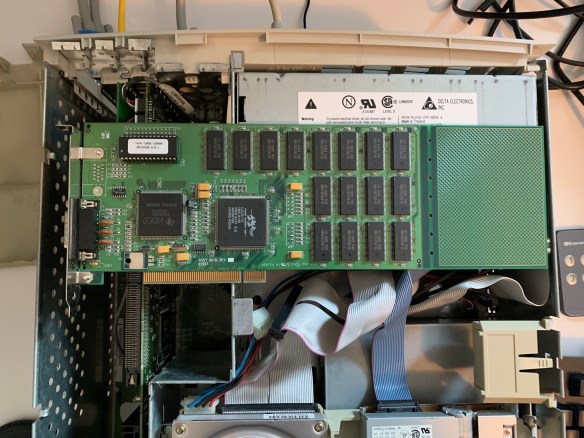
So, one of the PCI slots has a Vertex Twin Turbo 128M8A video card in it. There is not much about this card on the internet. There’s a photo of one on Wikimedia Commons though. I’ll have to investigate more.

Does it work though? Yes! Here it is on my desk:

The powered on Power Mac 7200/120

Even with Microsoft Internet Explorer 4.0 that came with MacOS 8.6, you can find some places on the internet you can fetch files from, at a not too bad speed even!

More fun times with this machine to come!

Photos from Taiwan

A few years ago we went to Taiwan. I managed to capture some random bits of the city on film (and also some shots on my then phone, a Google Pixel). I find the different style of art on the streets around the world to be fascinating, and Taiwan had some good examples.

I’ve really enjoyed shooting Kodak E100VS film over the years, and some of my last rolls were shot in Taiwan. It’s a film that unfortunately is not made anymore, but at least we have a new Ektachrome to have fun with now.

Words for our time: “Where there is democracy, equality and freedom can exist; without democracy, equality and freedom are merely empty words”.

This is, of course, only a small number of the total photos I took there. I’d really recommend a trip to Taiwan, and I look forward to going back there some day.

Two Photos from Healseville Sanctuary

If you’re near Melbourne, you should go to Healseville Sanctuary and enjoy the Australian native animals. I’ve been a number of times over the years, and here’s a couple of photos from a (relatively, as in, the last couple of years) trip.

Leah trying to photograph a much too close bird
Koalas seem to always look like they’ve just woken up. I’m pretty convinced this one just had.

Photos from Adelaide

Some shots on Kodak Portra 400 from Adelaide. These would have been shot with my Nikon F80 35mm body, I think all with the 50mm lens. These are all pre-pandemic, and I haven’t gone and looked up when exactly. I’m just catching up on scanning some negatives.

Why you should use `nproc` and not grep /proc/cpuinfo

There’s something really quite subtle about how the nproc utility from GNU coreutils works. If you look at the man page, it’s even the very first sentence:

Print the number of processing units available to the current process, which may be less than the number of online processors.

So, what does that actually mean? Well, just because the computer some code is running on has a certain number of CPUs (and here I mean “number of hardware threads”) doesn’t necessarily mean that you can spawn a process that uses that many. What’s a simple example? Containers! Did you know that when you invoke docker to run a container, you can easily limit how much CPU the container can use? In this case, we’re looking at the --cpuset-cpus parameter, as the --cpus one works differently.

$ nproc
8

$ docker run --cpuset-cpus=0-1 --rm=true -it  amazonlinux:2
bash-4.2# nproc
2
bash-4.2# exit

$ docker run --cpuset-cpus=0-2 --rm=true -it  amazonlinux:2
bash-4.2# nproc
3

As you can see, nproc here gets the right bit of information, so if you’re wanting to do a calculation such as “Please use up to the maximum available CPUs” as a parameter to the configuration of a piece of software (such as how many threads to run), you get the right number.

But what if you use some of the other common methods?

$ /usr/bin/lscpu -p | grep -c "^[0-9]"
8
$ grep -c 'processor' /proc/cpuinfo 
8

$ docker run --cpuset-cpus=0-1 --rm=true -it  amazonlinux:2
bash-4.2# yum install -y /usr/bin/lscpu
......
bash-4.2# /usr/bin/lscpu -p | grep -c "^[0-9]"
8
bash-4.2# grep -c 'processor' /proc/cpuinfo 
8
bash-4.2# nproc
2

In this case, if you base your number of threads off grepping lscpu you take another dependency (on the util-linux package), which isn’t needed. You also get the wrong answer, as you do by grepping /proc/cpuinfo. So, what this will end up doing is just increase the number of context switches, possibly also adding a performance degradation. It’s not just in docker containers where this could be an issue of course, you can use the same mechanism that docker uses anywhere you want to control resources of a process.

Another subtle thing to watch out for is differences in /proc/cpuinfo content depending on CPU architecture. You may not think it’s an issue today, but who wants to needlessly debug something?

tl;dr: for determining “how many processes to run”: use nproc, don’t grep lscpu or /proc/cpuinfo

Photos from Tasmania (2017)

On the random old photos train, there’s some from spending time in Tasmania post linux.conf.au 2017 in Hobart.

All of these are Kodak E100VS film, which was no doubt a bit out of date by the time I shot it (and when they stopped making Ektachrome for a while). It was a nice surprise to be reminded of a truly wonderful Tassie trip, taken with friends, and after the excellent linux.conf.au.

Photos from Melbourne

I recently got around to scanning some film that took an awful long time to make its way back to me after being developed. There’s some pictures from home.

The rest of this roll of 35mm Fuji Velvia 50 is from Tasmania, which would place this all around December 2016.

Photos from long ago….

It’s strange to get unexpected photos from a while ago. It’s also joyous.

These photos above are from a park down the street from where we used to live. I believe it was originally a quarry, and a number of years ago the community got together and turned it into a park. It’s a quite decent size (Parkrun is held there), and there’s plenty of birds (and ducks!) to see.

Moorabbin Station

It’s a very strange feeling seeing photos from both the before time, and from where I used to live. I’m sure that if the world wasn’t the way it was now, and there wasn’t a pandemic, it would feel different.

All of the above were shot on a Nikon F80 with 35mm Fuji Velvia 50 film.

op-build v2.5 firmware for the Raptor Blackbird

Well, following on from my post where I excitedly pointed out that Raptor Blackbird support: all upstream in op-build v2.5, that means I can do another in my series of (close to) upstream Blackbird firmware builds.

This time, the only difference from straight upstream op-build v2.5 is my fixes for buildroot so that I can actually build it on Fedora 32.

So, head over to https://www.flamingspork.com/blackbird/op-build-v2.5-blackbird-images/ and grab blackbird.pnor to flash it on your blackbird, let me know how it goes!